Key Documents
Technical Information.
Access product literature, technical drawings, practical video guidance and FAQs to support specification, installation and ongoing use of Alpeco equipment.
All technical resources are grouped here for ease of access and everyday use. The content is intended to support accurate specification, efficient installation and reliable long-term operation. Scroll through or use the buttons to jump straight to where you want to be.
Product Literature.
Use the links below to download our key product literature.
Tex
Flow Computer
Tex
Retro Fit
Test Control
System
Metered Delivery of
liquids from IBCs
Actiman Control Box
Parts List
Truck III with
Acti-Clear
Truck III
Electronic Register
Electronic Truck
Metering Solutions
Industrial
Flow Meters
Technical Drawings.
Bottom Loading Manifold
Flow Control Valves
- Back pressure check solenoid shut off valve (model 108-34)
- Digital Preset Valve (Model 115-3)
- Filter Seperator Rate of Flow shut off valve (model 119-5)
- Filter seperator shuts off valve (model 119)
- Perrett Hydrovalves
- Preset Control Valve (Model 115-5)
- Pressure reducing and solenoid shut-off valve (model 127-80)
- Pressure reducing valve (model 127-3)
- Rate of Flow Valve (model 120)
- Refuelling control valve (114-1)
- Refuelling control valve (model 114-1e)
- Refuelling control valve (model 114-3)
- Solenoid Shut Off Valve (model 115-2)
- Two stage preset with rate of flow valve (model 120-6)
Fuel and Oil Pumps
Fuel Product Return
Fuel Truck Foot Valves
Fuel Vapour Recovery
Positive Displacement Flow Meter
- Air Actuated and Differential Check Valves
- F7 and F15 Strainers
- M5 Flow Meter Specification
- M7 Flow Meter Specification
- M15 Flow Meter Specification
- M25 Flow Meter Specification
- M30 Flow Meter Specification
- M60 Flow Meter Specification
- MA5 LPG Flow Meter Specifications
- MA7 LPG Flow Meter Specifications
- MA15 LPG Flow Meter Specifications
- Mechanical Air and Vapor Eliminators
- Mechanical Bulk Plant Air Eliminators
- MS Bulk Flow Meters Installation Operation and Maintenance Guide
- MS Bulk Flow Meters Specification
- Pulse Output Device (POD)
- Solenoid Operated Block Valves Installation and Parts
- Sound Air Eliminator
- V7 Preset Valve Full Specification
Truck Faucet Valves
Useful Videos.
How to set up delivery in TEX
How to set a new load in the inventory of TEX
How to use a Wifi device with TEX
How to change clock settings in TEX
How to reprint a ticket in TEX
How to retrieve a ticket on an old Truck III register
How to reset the time on a Liquid Controls Truck III register
How to enter the vehicle registration number into a Liquid Controls Truck III register
How to enter a new load and view inventory on a Liquid Controls Truck III register
How to add a line space to a printed ticket from a Liquid Control Truck III Register
FAQs.
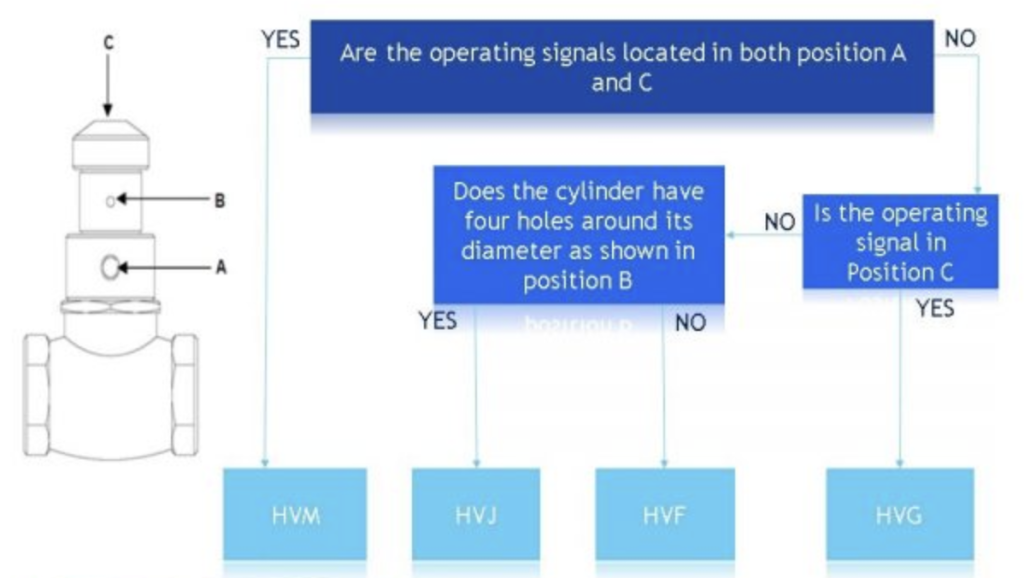
How to select the correct Hydrovalve
What is the passcode to access the parameter list on the Lectrocount TE550 register?
To access the full parameter list on the Lectrocount TE550 register, enter 09 and then enter the passcode 161249.
This will enable you to change parameter settings for example changing the time.
What is the passcode to access the parameter list on TE550 Truck III register?
To access the full parameter list on the TE550 Truck III register, enter 09 and then enter the passcode 222222.
This will enable you to change parameter settings for example changing the time.
How to change the clock on an Lectrocount meter
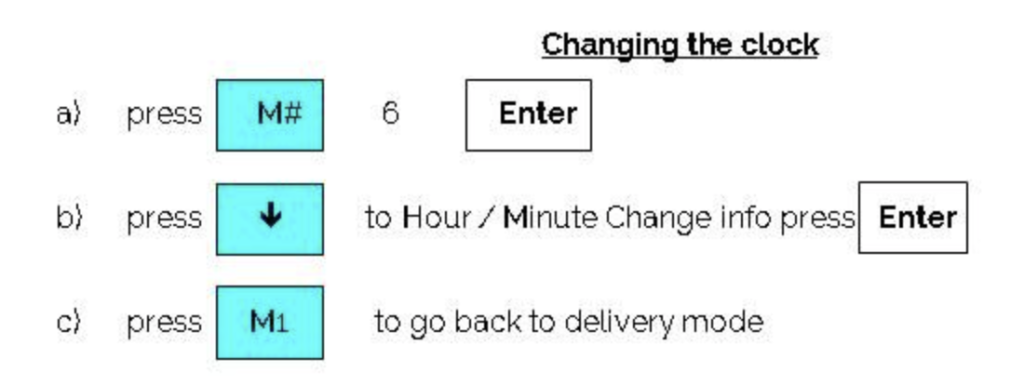
How to change the time on a TE550 meter
Print off any current meter delivery
Display shows duplicate yes/no, select no, press enter
Display shows diesel etc., press 0 and 9 button together
Display asks for code, enter 1-6-1-2-4-9 and enter
Display shows series of sub-headings, select time/date, press enter
Display shows time OR date, e.g. select time and enter
Display shows current time and new time, press clear and write in new time using number keys and press enter
Press clear button, display shows sub-headings column, parameters etc.
Press 0 and 9 button together to leave calibration file
How to display Lectrocount end of shift tickets
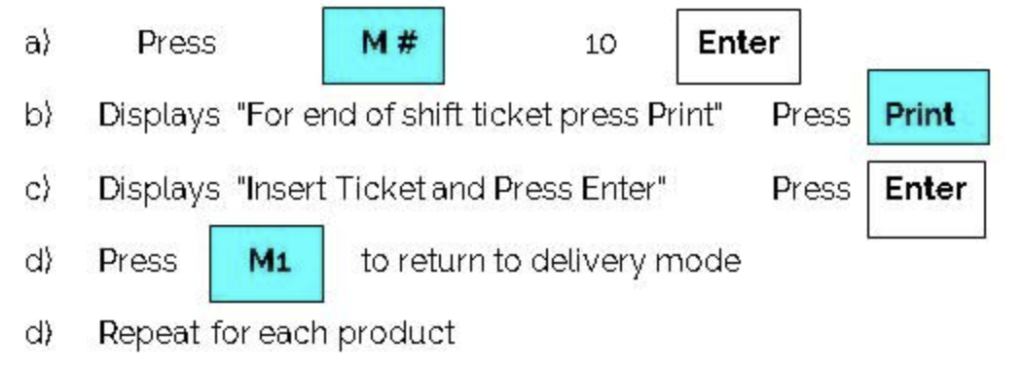
How to print end of shift ticket on TE550 meter
TE550 display shows “DUPLICATE YES/NO”, press ENTER
TE550 display shows “DIESEL/KERO/GAS OIL” etc.. Press CLEAR/EXIT button
TE550 display shows “CLOSE SHIFT”, YES/NO. Select YES using F3/F4 buttons. Insert ticket into printer and press ENTER
After ticket has finished printing, TE550 display reads “DUPLICATE YES/NO”, press ENTER (to conclude operation)
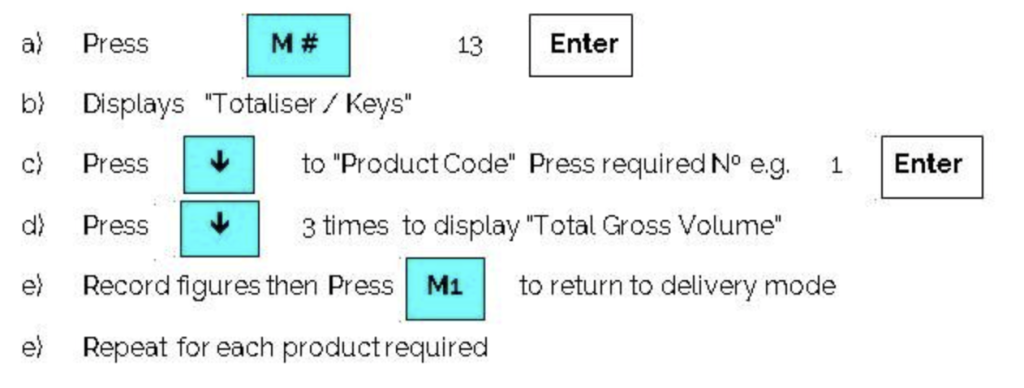
How to display Lectrocount totaliser readings
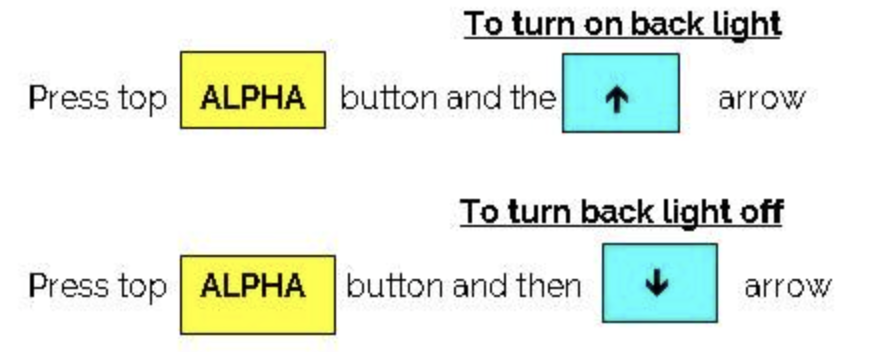
How to turn the Lectrocount backlight on and off
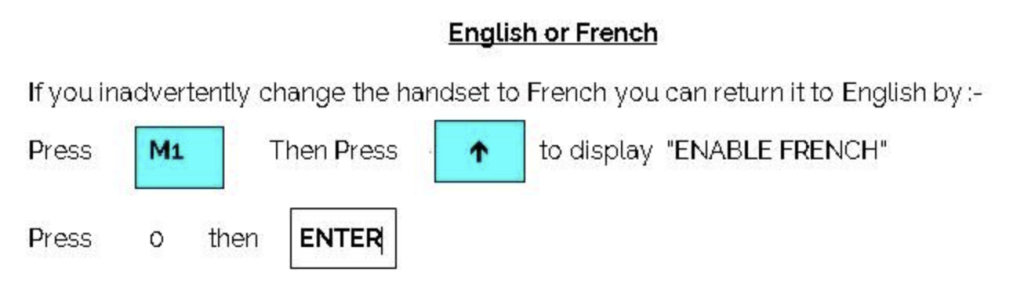
How change the language on the Lectrocount meter
Find a previous delivery on a TE550 meter
In order to find a previous delivery, please operate the TE550 as follows:
Duplicate yes/no? Select no and enter
Press 0 & 9 together, code? Press 1 6 1 2 4 9 & enter
Select event from list & enter
Show/close shift? Select show & enter
From table select delivery & enter
Overwrite start date & finish date. Select product (use F1/F2 to select) & press enter
Select appropriate delivery (highlighted by box) & enter
Press F1 to print, press enter to start print
Press clear/exit repeatedly until parameter sub-heading is restored, press 0 & 9 to escape cal. mode